


Before we jump into DNS records, let’s first understand what DNS is.
DNS
Think of DNS as the phonebook of the internet. We humans are great at remembering names (like google.com), but computers only understand numbers (IP addresses like 142.250.190.46).
DNS translates the domain names we know into the IP addresses computers need, ensuring your browser reaches the correct server.
Want to understand how DNS resolution works?
If you want to see exactly how the process works, including a hands-on guide using the
digcommand.Check out the full article here 👇
Domain Name System (DNS): What It Is and How It Functions
DNS Records
DNS records are specific instructions stored on authoritative DNS servers. They tell the internet how to handle requests for your domain, such as mapping domain names to IP addresses, routing emails, and verifying domain ownership.
Think of a single contact in your phone book. It doesn’t hold just one piece of information; it has different fields for different purposes:
Mobile Number: For calling.
Work Email: For sending documents.
Home Address: For visiting.
DNS records work in a similar way.
Types of DNS Records
A Record
An A Record maps a domain name directly to an IPv4 Address. It answers the question: "What is the IP address for this specific domain?".
Example:
You can manage DNS records from your DNS provider. In this example, I am using Hostinger.
Below is an example of an A record:

The
@Symbol: This is just shorthand for your root domain. It means this record applies toyourdomain.comdirectly, without any prefixes likewwworblog.The TTL value (50): This stands for Time to Live. Think of it as a freshness timer.
It tells other systems to cache this information for 50 seconds before requesting it again.
Example of an A record for a subdomain:

The Name field (
lab): Instead of the root, this record creates a subdomain.Result: The IP address will only be used when someone visits
lab.mydomain.com.Use Case: This is perfect for separating your main site from your projects, blog, or testing environments while keeping them under the same domain.
Test using the dig command:
The above records are configured for my domain satpal.cloud.

AAAA Record
An AAAA Record maps a domain name directly to an IPv6 Address. It also answers the question: "What is the IP address for this specific domain?"
It work the same way as A records, but they point to an IPv6 address instead of an IPv4 address.

CNAME Record
It stands for Canonical Name Records.
This record acts as an alias or nickname for another domain. It forwards a domain to another domain name without providing an IP address. This ensures that if the destination's IP changes, your alias follows it automatically.

Example:
When you create a blog on Hashnode but want it to live at blogs.yourdomain.com, Hashnode doesn't give you an IP address. They give you a domain name: hashnode.network.
Why? Because Hashnode manages thousands of servers. If they changed their server IP, they wouldn't want to email every single user to update their DNS. By using a CNAME, they can change their IPs in the background, and your link still works.

Test using the dig command:

MX records
It stand for Mail Exchange Record.
It directs incoming emails to a specific mail server. It tells the internet, "If you have an email for @yourdomain.com, please deliver it to this server."

Example:

Name: Applies to the subdomain
send.enjoybill.Target Address: Handles mail sent specifically to addresses like
user@send.enjoybill.yourdomain.com.Priority (10): Sets the order of importance. Since it's the only record here, it handles 100% of the traffic for this subdomain.
Content: Routes email to Amazon SES (Simple Email Service) in the given region (
ap-northeast-1).
Test using the dig command:

TXT Record
A TXT record allows domain administrators to insert arbitrary text into the Domain Name System (DNS). While originally intended for human-readable notes, today it is almost exclusively used for machine-readable verification.
Examples of Practical Use Case
Domain Verification:
If you want to host your blog on your custom domain (
yourdomain.com) using Hashnode. But Hashnode needs to be sure you actually own that domain before they let you use it. They can't just take your word for it (otherwise, anyone could claimgoogle.com!).The Challenge: Hashnode generates a random, unique code just for you (e.g.,
hashnode-domain-verification=12345...).The Action: You log into your DNS provider (Hostinger) and paste this code into a TXT Record.
The Verification: You click "Verify" on Hashnode.
The Conversation (Behind the Scenes):
🤖 Hashnode Bot: Knock knock. I am looking for the owner of
yourdomain.com.🌐 Your DNS: I am the server for
yourdomain.com.🤖 Hashnode Bot: Prove it. Do you have the secret note?
🌐 Your DNS: Yes, I have a text note here. It says:
hashnode-domain-verification=12345...🤖 Hashnode Bot: That matches the code I gave you! Ownership verified. Connected! ✅
SPF (Sender Policy Framework):
Is is a Guest List and lists exactly which IP addresses and servers are authorized to send email for your domain. So, prevents unauthorized servers (spammers) from impersonating you.
DKIM (DomainKeys Identified Mail):
The "Digital Signature". Specific cryptographic signature attached to emails using a private key. The receiver uses your Public Key (hosted in your DNS TXT record) to verify the email hasn't been tampered with.
DMARC (Domain-based Message Authentication, Reporting, and Conformance):
The Rule Book who tells email providers what to do if an email fails the SPF or DKIM checks (e.g., "Reject it" or "Send it to spam").
NS record
The NS Record stands for Name Server Record who acts as the Manager of your domain. Instead of pointing to a specific website or email server, it stores the name of the authoritative server that holds the entire address book (DNS Zone) for your domain.
This record is the crucial link that connects your domain registrar (where you bought the name) to your provider (where you manage your records).
Example:
I have bought the Domain Name through Holsinger. They have they own name server as below.
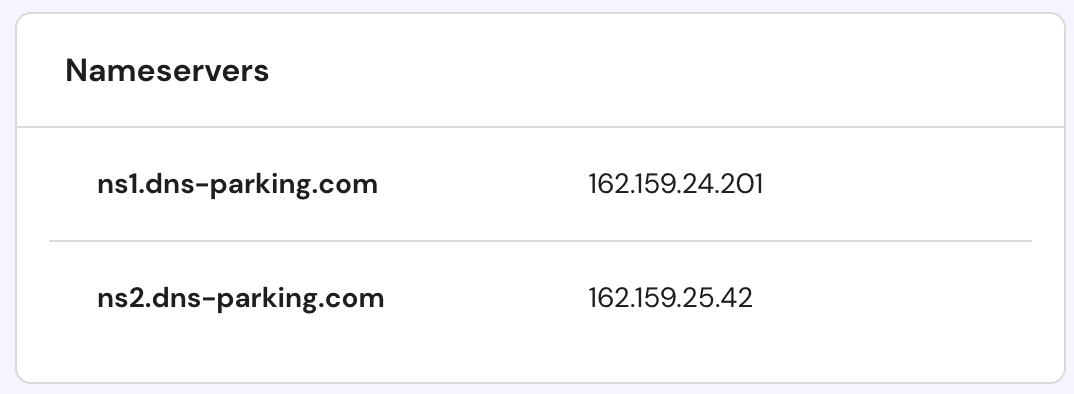
Now i want that i want to manage my domain through Cloudflare. So, I have updated the Name Server to CloudFlare’s NS.
SOA Record (Start of Authority)
The SOA record acts as the mandatory Identity Card for your entire DNS zone, storing critical administrative details like the administrator's email, the serial number for tracking updates, and refresh timers. Every domain must have exactly one SOA record, serving as the ultimate source of truth that dictates how other servers should cache and update your domain's information.
SRV Record (Service Record)
The SRV record is a Port Specialist that directs traffic to a specific server and port number for specialized applications like VoIP. Unlike standard records that simply point to an IP address (the building), the SRV record specifies the exact port (the room number) and protocol required to connect to the service running inside.
PTR Record (Pointer Record)
The PTR record performs the exact opposite function of an A Record by mapping an IP address back to a domain name (Reverse DNS). It is primarily used for email security and network verification, acting as a background check to prove that an IP address sending traffic truly belongs to the domain name it claims to represent.
Recap

A Record Vs CNAME Record
| Feature | A Record (Address) | CNAME Record (Canonical Name) |
| Points To | An IP Address (e.g., 192.0.2.1). | Another Domain Name (e.g., hashnode.network). |
| Best For | Your Root Domain (example.com) or static servers. | Subdomains (blog.example.com) using 3rd-party services. |
| Performance | Slightly faster (direct lookup). | Adds a tiny delay (requires a second lookup). |
| Restriction | Can exist alongside other records (like MX). | Cannot exist with other records for the same name. |
NS Record Vs MX Record
| Feature | NS Record (Name Server) | MX Record (Mail Exchange) |
| Role | Manager / Delegator. | Mail Specialist. |
| Function | Tells the internet who manages your DNS records (e.g., Cloudflare, Hostinger). | Tells the internet where to send email (e.g., Gmail, Outlook). |
| Scope | Affects the entire domain and all services. | Affects only email delivery. |
| Key Difference | Points to a Provider (nameservers). | Points to a Mail Server. |
Mastering these records gives you full control over how the world connects to your digital doorstep, from website traffic to email security.
"The internet is a city, and DNS is the street signage. Without it, you can build the roads, but no one will ever find their way home."
— Unknown
To uncover more secrets about the invisible infrastructure powering your daily life, be sure to read my full series on The Internet.
Check out the full series: The Internet by Satpalsinh Rana
About the author
Frontend Developer 💻 | Fueled by curiosity and Tea ☕ | Always learning and exploring new technologies.
Comments
Join the discussionNo comments yet. Be the first to comment.
The Internet
From typing a URL to a fully loaded webpage, data travels through a global network of fiber cables, routers, and servers. This series covers core concepts every CS engineer should know to understand how the modern web works.


