

Variables & Types: The First Principles of JavaScript
A guide to JavaScript's variable and data type system without losing your mind.
Frontend Developer 💻 | Fueled by curiosity and Tea ☕ | Always learning and exploring new technologies.
What is Variable?
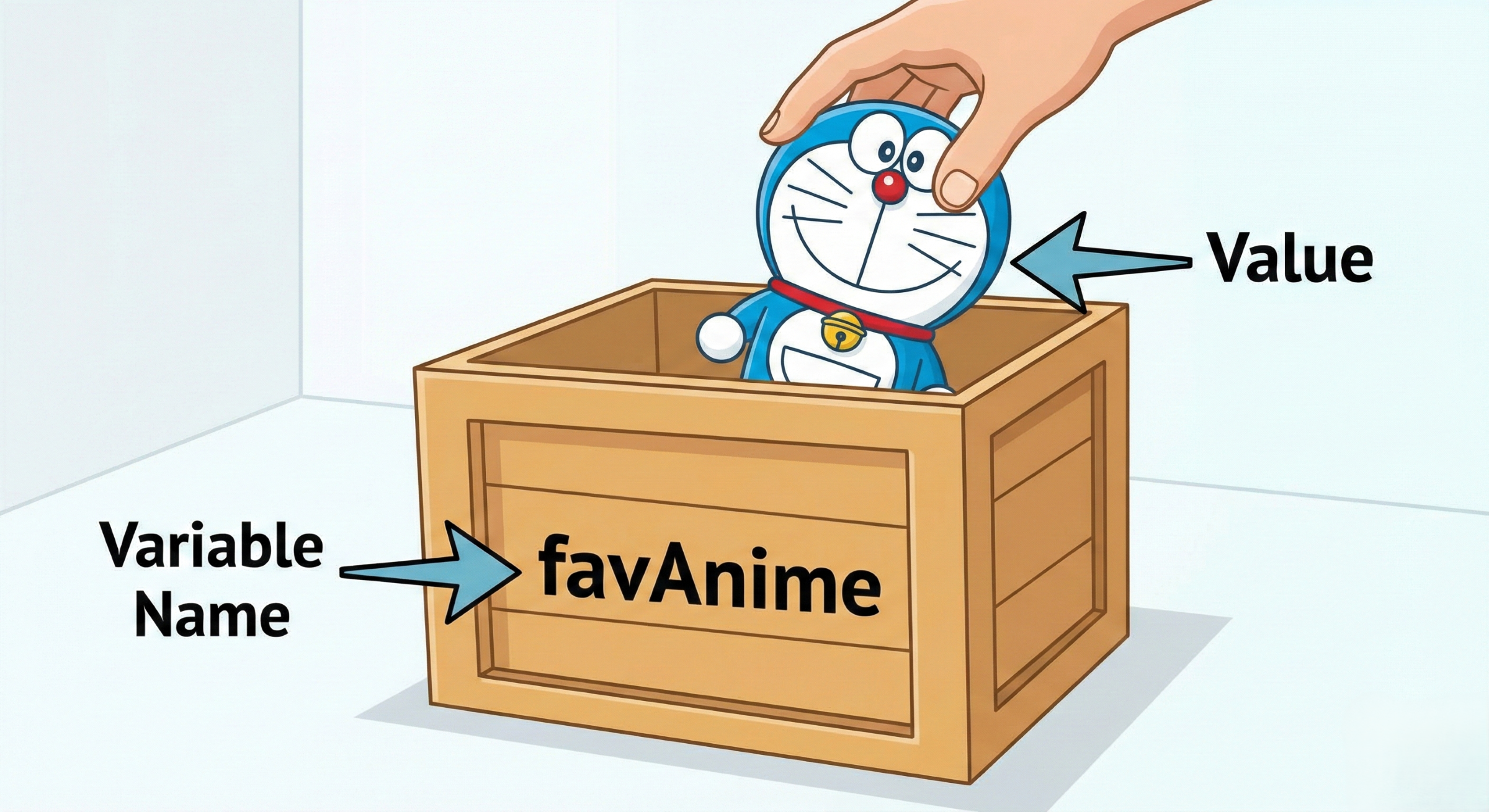
First, you need to understand what a variable is in computer science. In simple words a variable is an identifier that references a value stored in memory.
Example, the image below shows how we can think of a variable named favAnime, with the value doraemon stored inside it.
Why Do We Even Need Variables?
You might think, "Why not just type 'Doraemon' every time I need it?"
Well, variables make our lives easier, Imagine you use the name "Doraemon" in 100 different places in your code. With a variable, you just change it once at the top, and the whole program updates instantly.
What if Variables Didn't Exist?
If we didn't have these variables, programming would be a total nightmare:
Without variables, a program could not store intermediate results in memory, making multi-step computations hard.
You couldn't have high scores in games or a profile on social media. Since there’s no way to store your score or your bio, the app would look exactly the same every time you opened it.
Variable in JavaScript
Now you know what is Variable. Let's use it with JS.
var name = "Satpal";
When you write above line , you are performing a two-step process in a single line.
Declaration
Initialization
we can re-write it as,
var name;
name = "Satpal";
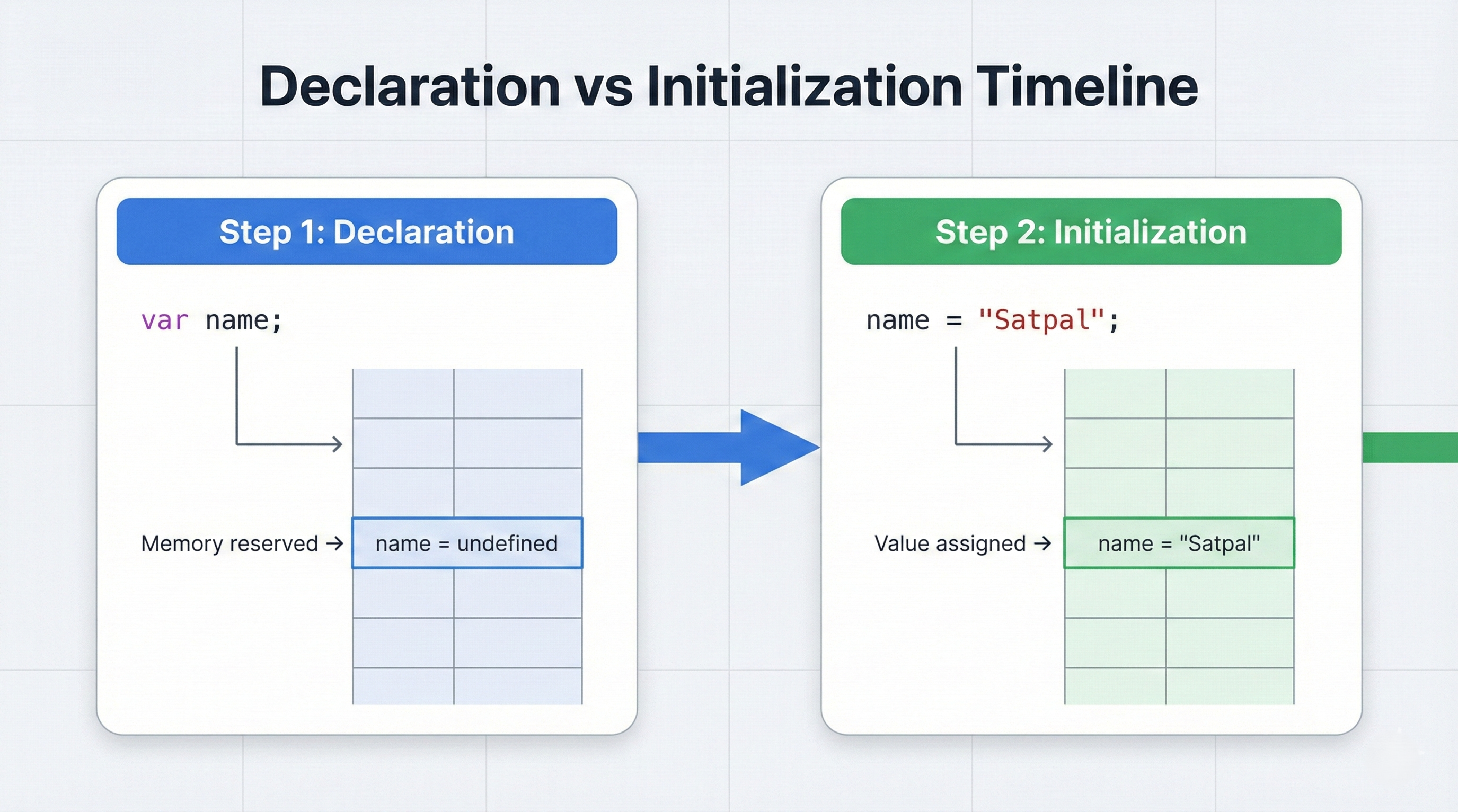
Declaration
var name;
This is the moment you buy a box. You haven't put anything in it yet, but you’ve written name on it.
So, here we are telling the computer, "Hey, I need you to reserve a small spot in your memory and call it name."
Just a JavaScript thing, at this point the value will be undefined .
Initialization
name = "Satpal";
This is the moment you actually place your item inside the box. The = sign is called the Assignment Operator. It take the value on the right and put into the box on the left.
☕ Pro Tip: In modern JavaScript (ES6+), we usually use
letorconstinstead ofvar.
We can declare the variable with three magical words, let , const or var.
Difference between var, let and const
Now that you know variables, you need to know how to buy the right box for the job. In JavaScript, not all boxes are created equal. Choosing between var, let, and const determines how your data behaves and who can see it.
Before we talk about where they live, let's understand their basic rules.
Keyword | Reassignable? | Can be Redeclared? | Modern Use |
| Yes | Yes | Avoid |
| Yes | No | Use if assigned value changes |
| No | No | Use if assigned value not changes. |
var name = "Satpal";
let age = 24;
const birthDate = "1999-01-01";

name = "Satpalsinh"; // Allowed
age = 25;           // Allowed
birthDate = "2000-01-01"; // Error! You can't change a constant.

Types of Scope
Scope is the boundary of your variable. Think of it like a Security Clearance some variables can go anywhere, while others are locked in a specific room.
Global Scope: A variable declared outside any curly braces
{ }is Global. Every part of your code can see and use this variable. Consider it to be like the Sun. No matter what room of the house you are in, you can look out the window and see it.Function Scope: Variables declared inside a function are trapped there. Like a TV in a specific room. You can watch it while you are in that room, but you can't see it once you walk out into the hallway.
Block Scope: This is the most private level. A Block is any code between curly braces
{ }, such as anifstatement or aforloop. Like a locked drawer inside a room. Even if you are in the room, you can't see what's in the drawer unless you are specifically looking inside that small block.
Scope of var, let and const
var
var is Function Scoped.
Before 2015, this was the only way to make a box. However, it had a habit of leaking out of places. It only respects the walls of a function. It completely ignores blocks like if statements or for loops.
Because it ignores blocks, it leaks its value to the outside world.
function varTest() {
  if (true) {
    var x = "I leaked!";
  }
  console.log(x); // Output: "I leaked!"
  // x is visible here because 'var' escaped the 'if' block!
}
let and const
Both let and const are Block Scoped.
This is the modern standard for variables. They respect any set of curly braces { }. If they are born inside a block, they die inside that block.
This makes your code predictable and prevents accidental data overwrites.
function letTest() {
  if (true) {
    let y = "I am trapped!";
    const z = "Me too!";
  }
  console.log(y); // Result: ReferenceError: y is not defined
  console.log(z); // Result: ReferenceError: z is not defined
  // y and z stayed safely inside the 'if' block walls.
}
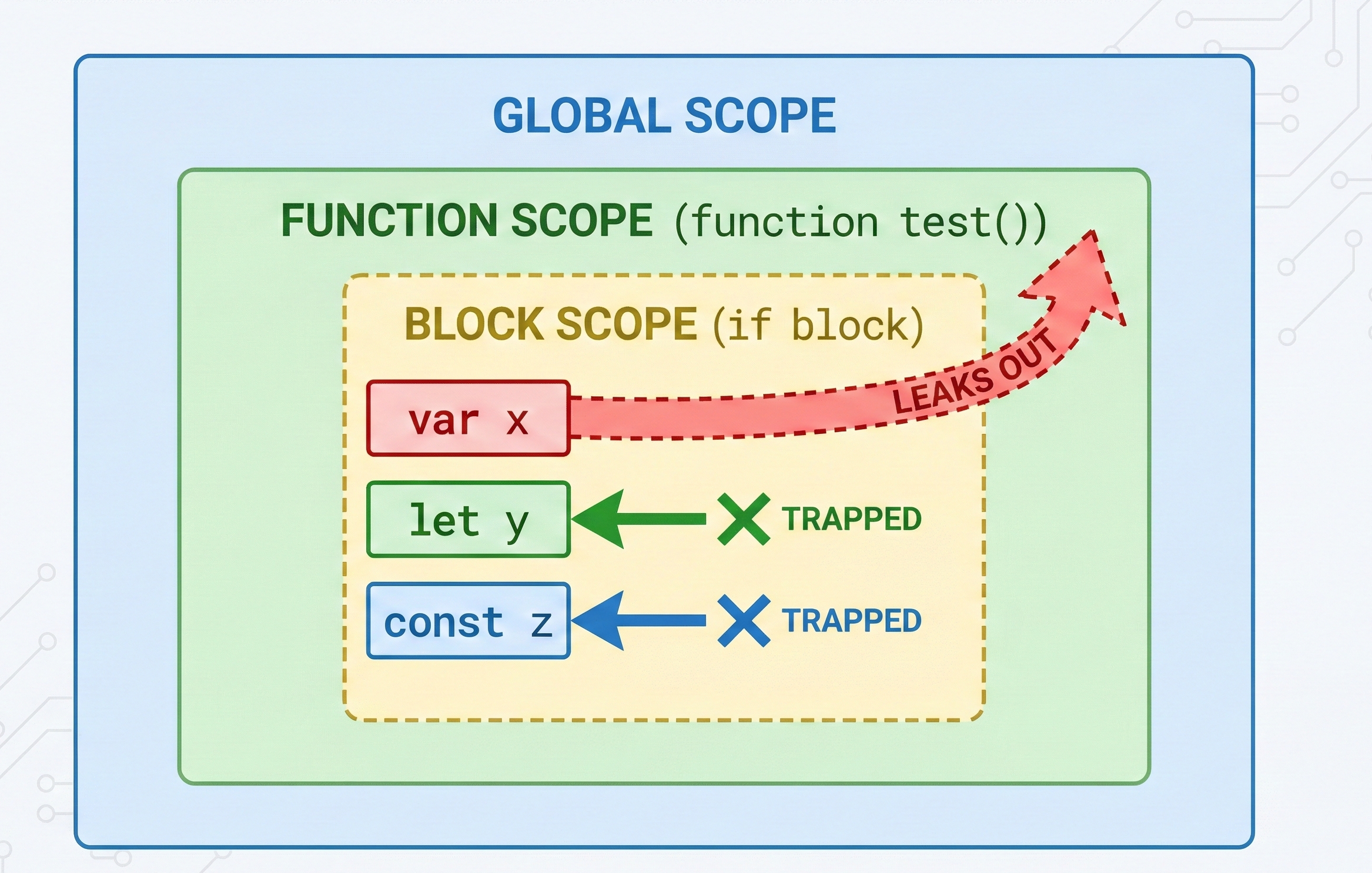
Comparison
Scope Level | var | let | const |
Global Scope | Accessible | Accessible | Accessible |
Function Scope | Trapped | Trapped | Trapped |
Block Scope ( | Leaks Out | Trapped | Trapped |
Data Types
In Computer Science, the computer doesn't see Doraemon or Satpal. It only sees 0s and 1s.
A data type is the type of data a variable has, like is it a text or a number?
In simple words you can consider Data Type a set of instructions that tells the computer: "Hey, this specific box needs 64 bits of space because it's a number," .
Example, if i want to store a favAnime then we need a string, or if we need a channel no. on which anime comes it can be a number.
Why Data Types?
In programming, data types are an important concept. A data type defines what kind of value a variable holds and what operations are allowed on it. To operate correctly on variables, the computer must know the type of data stored inside them.
Data Types in JavaScript
Dynamic Typing
In many language you need to tell what type of data you want to store in a box before buying it. So, according it gives you that size of box.
In JavaScript we have Dynamic Typing. This means JS is smart enough to look at what you put in the box and figure out the type for you.
If you put
var myBox = "Satpal", JS says: "Okay, that's a String."If you then change it to
myBox = 25, JS says: "No problem, I'll turn this into a Number box now."
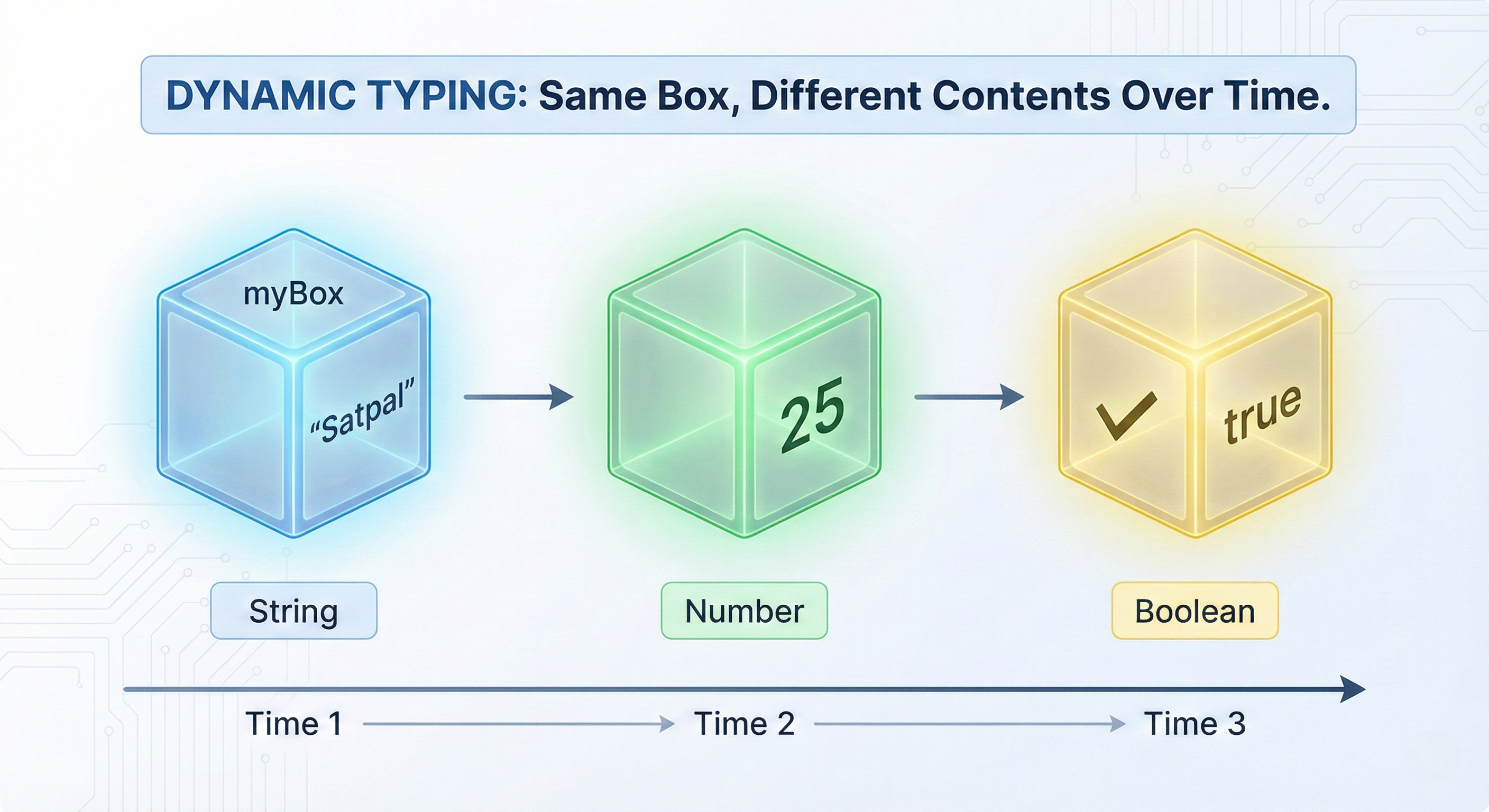
Type of Data Types in JavaScript
JavaScript divides all data into two types.
Primitive
Non-Primitive (Reference) Data Types
Primitive Data Types
The simple and most basic types. They are immutable, meaning the value itself cannot be changed you can only replace it with a new one.
Below are the 7 Primitive Data Types.
Type | Data / Description | Example |
String | Textual data |
|
Number | Integers and Decimals |
|
Boolean | Logical values (True/False) |
|
Undefined | A box that exists but has no value yet |
|
Null | A box we intentionally marked as empty |
|
BigInt | Massive numbers beyond the safe limit |
|
Symbol | A unique hidden identifier |
|
Non-Primitive (Reference) Data Types
These are complex containers that can hold multiple values, other boxes, or even instructions.
Type | Data / Description | Example |
Object | Stores data in |
|
Array | Stores a numbered list of items (like your favorite anime list). |
|
Function | Stores a reusable block of code that performs a task when called. |
|
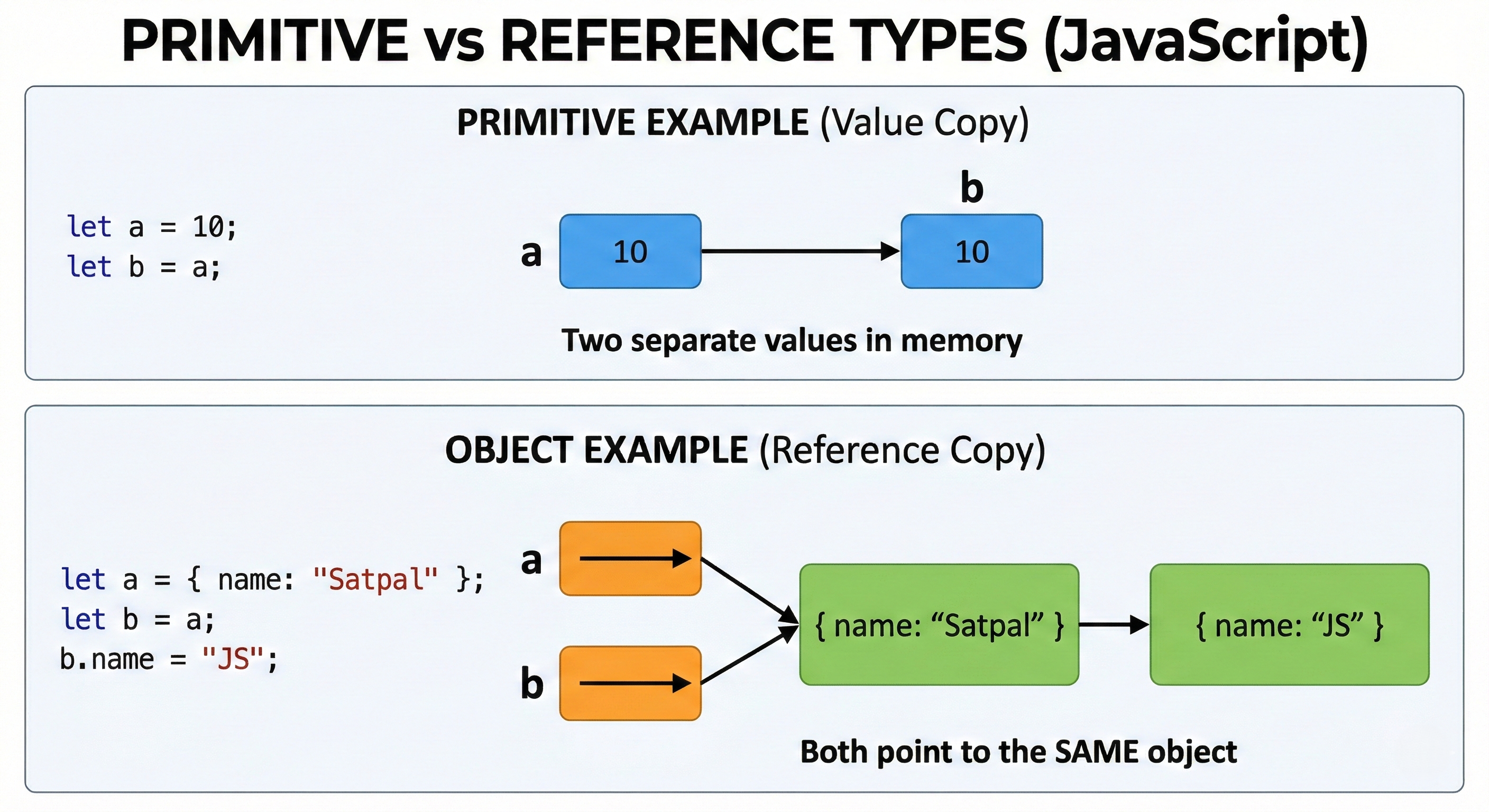
FAQs
Q1. Do JavaScript variables store values or memory addresses?
Primitives store values directly and Objects store references (memory addresses).
Q2. What happens when you assign one object to another variable?
let a = { name: "Satpal" };
let b = a;
b.name = "JS";
console.log(a.name);
// Output: "JS"
Both variables reference the same object.
Q3. What is pass-by-value vs pass-by-reference in JS?
Primitives → copied by value.
Objects → reference is copied.
Q4. What is hoisting?
Variable declarations are moved to the top of their scope during compilation.
Q5. Why does this behave differently?
console.log(a);
var a = 10;

console.log(b);
let b = 20;
var→ printsundefinedlet→ ReferenceError (Temporal Dead Zone)
Q6. Can const objects be modified?
const obj = { name: "Satpal" };
obj.name = "JS";
Allowed. const prevents reassignment, not mutation.
Q7. Why does this print 3 three times?
for (var i = 0; i < 3; i++) {
  setTimeout(() => console.log(i), 0);
}
Because var is function-scoped.
Proper Solution:
for (let i = 0; i < 3; i++) {
  setTimeout(() => console.log(i), 0);
}
Q8. What is lexical scope?
Scope is determined by where variables are written in code.
Q9. What is a closure?
A function that remembers variables from its outer scope even after that scope has finished execution.
Q10. Why is typeof null object?
console.log(typeof null);
Historical bug kept for backward compatibility.
Q11. Why is this false?
console.log(0.1 + 0.2 === 0.3);
Floating-point precision issue.
Proper Solution
Q12. What are falsy values in JavaScript?
false, 0, -0, "", null, undefined, NaN
Q13. Is a function an object in JavaScript?
Yes. Functions are special callable objects.
Q14. Why was BigInt introduced?
To safely handle integers beyond Number.MAX_SAFE_INTEGER.
Q15. Are two Symbols with same description equal?
Symbol("id") === Symbol("id");
False. Every Symbol is unique.
"Variables are not just boxes for data; they are the handles we use to grasp the logic of the universe we are building."
— Developer Wisdom
Let's Connect! 🚀
I’m currently deep-diving into the JavaScript, building projects and exploring the internals of the web. If you're on a similar journey or just love talking about JavaScript, let’s stay in touch!
Connect on LinkedIn: Satpalsinh's Profile
Explore my Portfolio: Satpal's Portfolio
Follow my Blog: blogs.satpal.cloud
Keep coding and keep building.


